
Installment Payments / Recurring Payments
SuperInvite has a flexible solution when it comes to installment payments and recurring payments, and below is an overview of the variables you can choose between when setting up a product with installment payments. You can combine all types of products with installment payments in one and the same invitation.
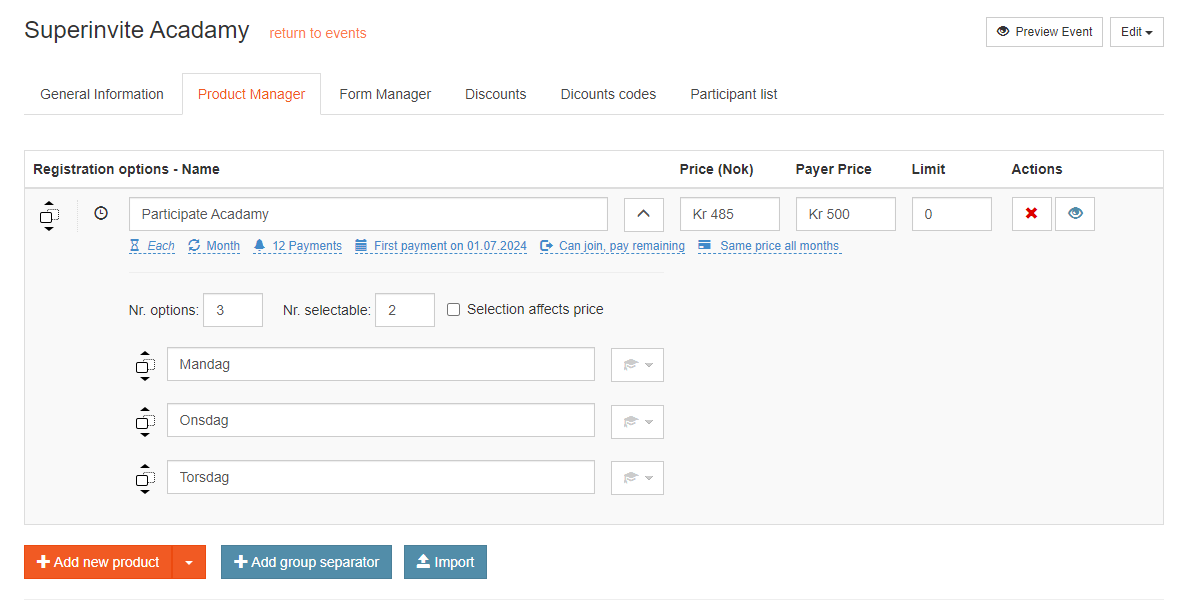
- Interval type – Here you can choose between Day, Month and Year as the interval for when the charge should happen automatically.
- Number of intervals – Here you set how many intervals you want to charge. For example, if you set 6 intervals, and "month" as the interval type, it will be charged once per month, for 6 months. You can leave this open without setting a value, in which case the intervals will be unlimited.
- When the first charge starts – You can set a future start date for when the first charge should start, or you can let the first charge start when the person registers.
- Handling of intervals
- Can join later, pay only remaining intervals – This means that if 6 intervals are set, and someone joins after the second interval has been charged, they will only pay for the 5 remaining intervals.
- Can join later, pay all intervals anyway – This means that if 6 intervals are set, and someone joins after the second interval has been charged, they will still pay for all 6 intervals, but will be one interval behind.
- Not allowed to join later – This means it is not possible to register or pay after the date for the first charge has been set.
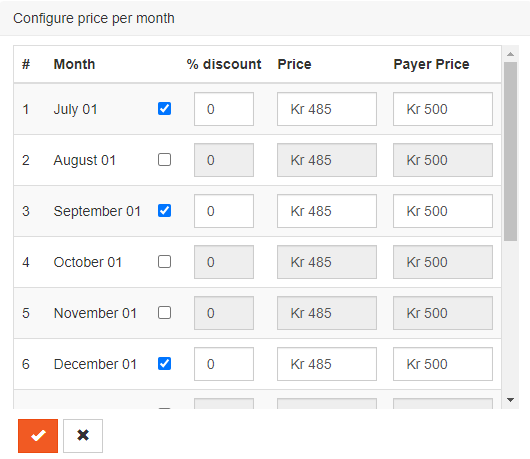
- Handling of prices throughout the period – If you want to set different prices for the charge per month throughout the period, you can choose to do so. Check the box for the month you want a different price for, and set the desired price. The different prices will also be shown to those who register.
Note: You can easily move products and categories up and down in order if you like, by dragging them with your mouse pointer to where you want to place them. If you have been working for a long time rearranging many products and categories, it can be worthwhile to save all changes, and then press CTRL+F5. This resets your page, so that your browser can more easily handle the new changes.