
Enter an order manually
In some cases you need to enter an order manually. This could, for example, be a person who paid in cash for something, and you want to get the person into your lists.
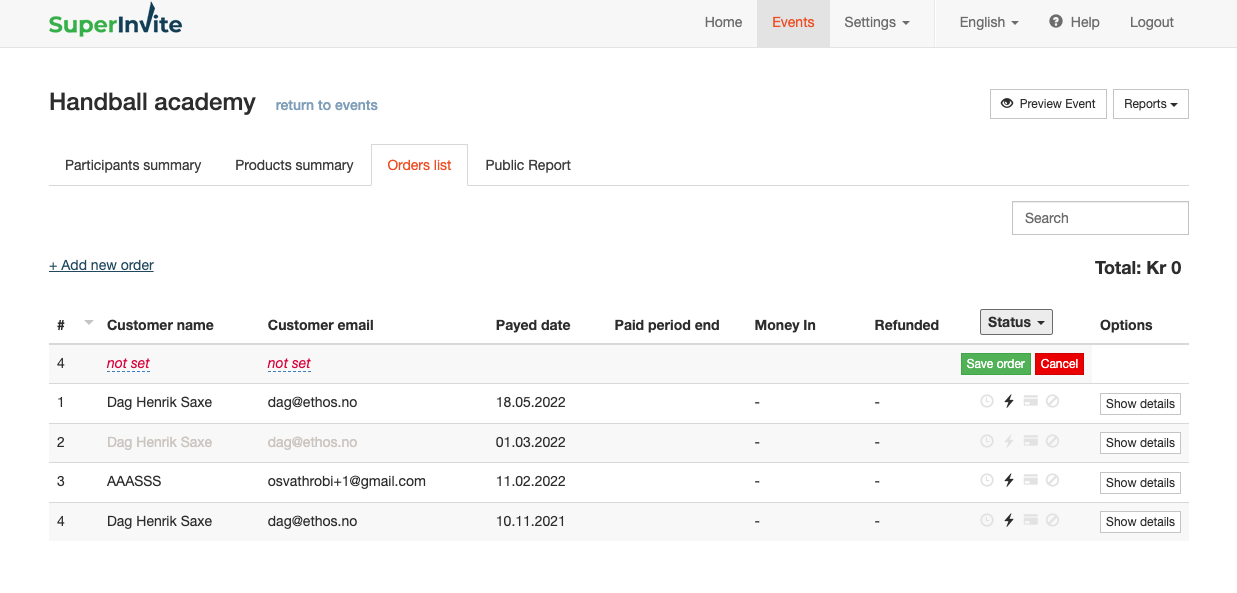
To enter an order manually, proceed as follows:
- Go to Reports and select Order list.
- Click Enter order manually, which you'll find as a link in the top left.
- Enter name and email to create a new order line. Click save changes.
- Click Show details, and you'll enter the order you created, where you must complete the order details.
- To add products to the order, do the following:
- Add more options – add new option
- Select Change under order content and select what you want
- Fill in the registration form on the right side
- Enter information about the person you're registering manually.
- Click Save at the bottom.
Note: Orders that were entered manually can be deleted, but orders that were not entered manually cannot be deleted.