
Options / Products
Options is the same as products, and this is where you set the name and price of the product. This section is also where you set all the other variables that apply to products and what you offer.
See a more detailed description of how to handle all product types in SuperInvite under product types.
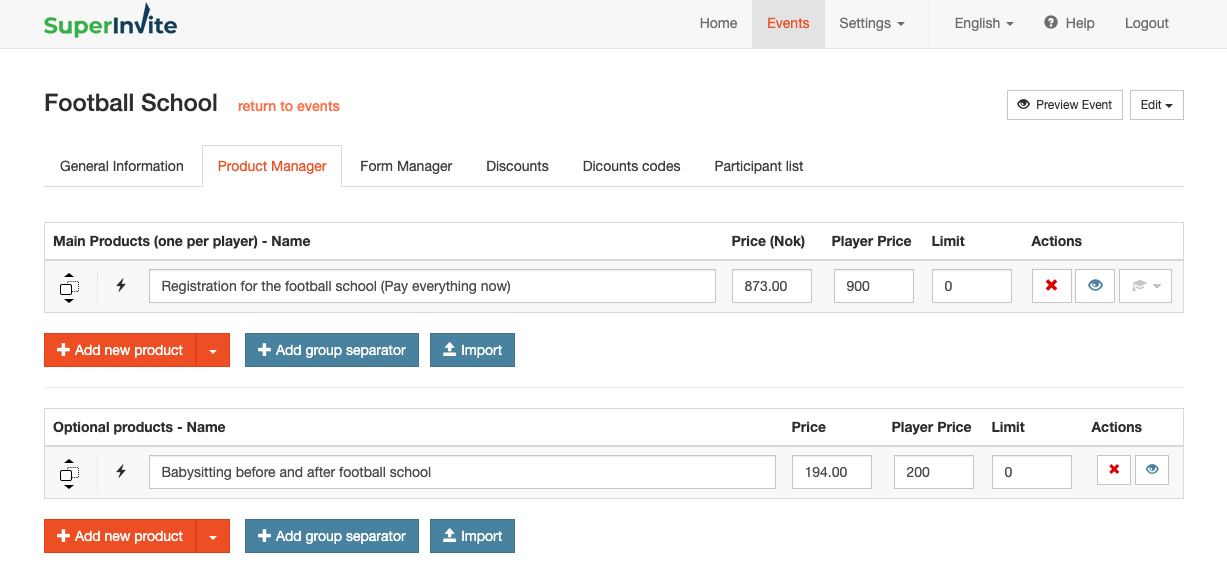
For each product you create, you can set the following variables:
- Price Kr – This is the amount the club or organization receives
- Payout price Kr – This is the total amount paid by the person paying for the product.
- Max quantity – If you have a limit on how many can purchase the product, you can set a quantity here. If you use Max quantity per day, it will override the max quantity here.
- Delete (red cross) – Here you can choose to delete a product you have added
- Hide (eye) – Use this if you want to hide a product on your invitation without deleting it. This function is also used when setting up discount codes – see more about discount codes here.
- Set weekday (hat) – Mark which weekday(s) the product applies to, so you can use the "attendance list" for an overview of who is attending or not.
Note: If you have set up your products previously in another invitation, you can easily fetch / copy them from a previous invitation by using "Import", where you retrieve products from previous invitations.