
Sending out a message
If you want to send out a message to different groups based on filtering choices you define yourself, you can easily do that in Superinvite. Here's how:
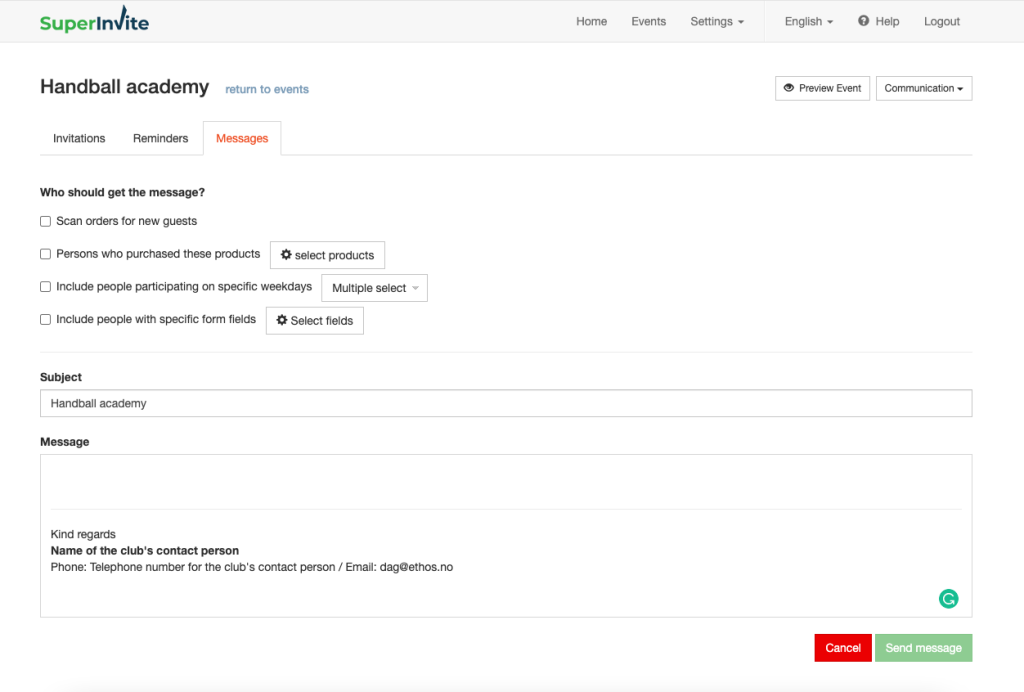
- Go to Communication and New message.
- Choose which groups you want to send to.
- Import all registered – This sends to everyone who has responded to the invitation you sent, as well as anyone who was added manually or via the open invitation link.
- People who purchased the following option – Here you can also filter by groups who have purchased specific products by selecting People who purchased the following option
- Enter the Subject for the message, and the text you want to communicate to the people you choose to reach.
Remember to review the message carefully before sending it.
Note: Remember that you can filter on different variables such as products purchased, etc. when sending out messages.