
Setting Up Reminders / Payment Reminders
When an invitation is sent out, everyone receives a unique link they click to go to registration and payment. SuperInvite can therefore know who has paid and who hasn't, and automatically send a reminder.
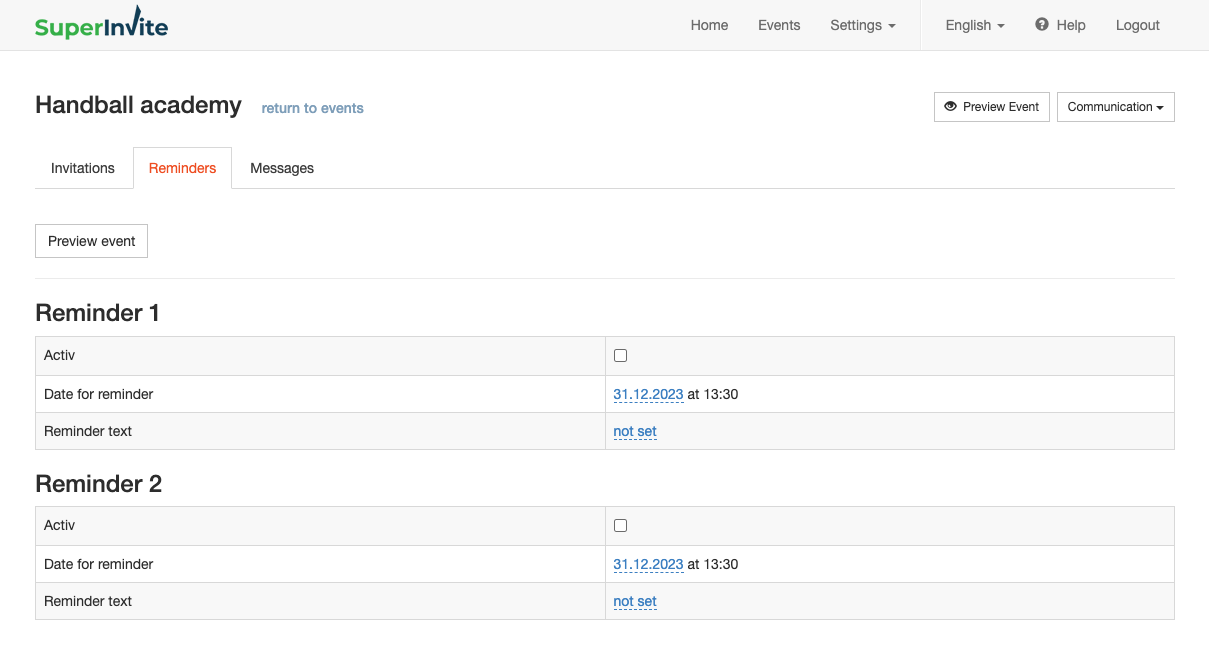
To set up a reminder, go to Communication and Reminders. Here you can set up up to two reminders that will be sent out automatically, based on the variables you set.
| Value | Description | | --- | --- | | Active | Set whether you want it active or inactive. If this is set to inactive, no reminder will be sent out. | | Reminder date | The date the reminder will be sent out. The time will be around 1:30 PM and cannot be changed. | | Free text | Here you can write your own message that will be shown in the email that is sent out. This is in addition to all the information found under general information, which will also be shown in the reminder email. |
Note: If someone receives an invitation by email, but chooses to enter via the open invitation link and then uses a different email than the one they were invited with, they will receive a payment reminder. This happens very rarely, but is often the reason someone who has already paid reports that they shouldn't have received a reminder.